WuZang Display Font for Whimsical Craft Projects
If you’ve ever spent ten minutes tweaking a label just to get that “playful but polished” vibe right—you know how much a single font can shift the entire feel of your handmade product. That’s why I reached for WuZang the moment I saw its joyful, bouncy letterforms. It’s not just another display font—it’s a tiny burst of personality you can stamp, cut, print, or layer into nearly every physical and digital craft project you make.
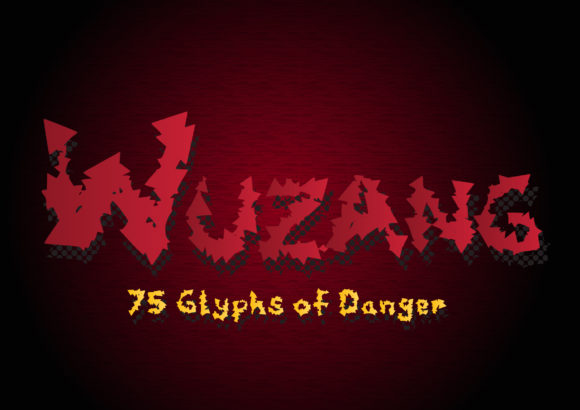
WuZang is a hand-drawn–inspired display font with rounded terminals, gentle irregularities, and a light bounce in its rhythm—like handwriting that’s had just enough coffee to be charming, but not so much it loses legibility. It’s not overly ornate, and it doesn’t lean into cutesy clichés. Instead, it lands somewhere between nostalgic storybook charm and modern craft sensibility—perfect for makers who want warmth without sacrificing polish.
Where WuZang Shines in Real Craft Business Use
I use WuZang most often where first impressions matter: product labels, greeting cards, boutique tags, and seasonal signage. Its friendly weight and open spacing hold up beautifully at small sizes—yes, even on 1-inch sticker labels for bath bombs or tea tins. On larger formats like wooden farmhouse signs or wedding welcome boards, WuZang adds instant character without competing with your design elements.
Here’s where it’s become my go-to:
- Candle and soap labels: Paired with a clean sans serif (think Montserrat or Poppins) for ingredients and weight info, WuZang handles the scent name (“Honey & Thyme”) or brand tagline with effortless charm.
- Printable invitations and save-the-dates: It reads clearly at 24–36 pt in PDFs, and when layered over textured paper mockups, it feels tactile and intentional—not generic.
- Digital printables and planner pages: I’ve used WuZang for section headers like “Monthly Intentions” or “Gratitude Log”—it gives structure while keeping things soft and inviting.
- SVG designs for Cricut and Silhouette: The outlines are smooth and consistent, with no thin hairlines or fragile serifs that snag during cutting. I’ve cut it from vinyl down to 0.75 inches with zero issues.
- Mugs, tote bags, and apparel: Because WuZang avoids extreme contrast or ultra-thin strokes, it prints crisply in screen printing and DTG—even on textured cotton or ceramic surfaces.
Readability + Practicality: What You Need to Know Before You Cut or Print
WuZang is designed for display use, not body text—so keep it for headlines, names, short phrases, and decorative accents. For anything longer than five words (especially on small stickers or packaging), pair it with a highly legible companion. I recommend testing at actual size: paste “Small Batch • Hand-Poured • Made With Love” into your design software at 14 pt and zoom to 100%. If the spacing feels airy but connected—and the lowercase “a,” “e,” and “g” stay distinct—you’re golden.
One practical note: WuZang includes standard OpenType features like stylistic alternates and ligatures—but I rarely enable them unless designing a premium invitation suite. For everyday product use, the default character set is more than sufficient, and it ensures consistency across platforms (Etsy listings, Canva templates, Cricut Design Space).
Smart Pairings That Elevate Your Branding
WuZang plays well with others—especially fonts that ground its whimsy. My top three pairings:
- A warm, low-contrast sans serif (like Quicksand or Nunito) for supporting text—great for labels, social media graphics, and web banners.
- A subtle serif (such as Cormorant Garamond or Playfair Display) when you want elevated contrast—ideal for wedding stationery or boutique packaging.
- A minimalist handwritten font (not overly scripty) for signatures or handwritten-style notes—adds dimension without visual noise.
Avoid pairing WuZang with other high-energy display fonts or tightly spaced scripts—they’ll fight for attention instead of harmonizing.
Licensing, Formats, and Commercial Confidence
WuZang is a commercial font, meaning you’re fully covered to use it in products you sell—physical or digital. That includes printable templates, SVG files, client branding projects, merch, and even editable Canva templates (as long as your license permits derivative digital assets). Just double-check the license details for specifics around resale rights and number of end users—most reputable sellers include clear terms for crafters and small businesses.
It comes in OTF and TTF formats, so it loads smoothly in Silhouette Studio, Cricut Design Space, Adobe apps, and free tools like Inkscape or DaVinci Resolve. No web font files are included—so skip using it directly on live websites unless you’ve embedded via a licensed web font service.
And while WuZang supports English, Spanish, French, and German characters (including accented letters and ligatures like “fi” and “fl”), it’s not built for extended multilingual publishing—so if your shop serves broad international markets, keep that in mind when choosing names or taglines.
Why WuZang Fits Into Your Maker Workflow—Not Just Your Mood Board
Let’s be real: not every fun font survives past the first test cut. WuZang does—because it balances expression with execution. It’s got enough personality to make your Etsy listing stand out in a scroll, yet enough clarity to reassure customers they’re buying from someone who cares about detail. When your candle says “Lavender Dream” in WuZang next to a minimalist line drawing, it tells a story before anyone even reads the description.
It’s also one of those rare display fonts that feels equally at home on a rustic chalkboard sign and a sleek digital planner cover. That versatility saves time—no need to hunt for a new font every season. One solid purchase, dozens of reliable applications.
Whether you're sketching ideas on paper, prepping an SVG bundle for your Etsy shop, or labeling your latest batch of herbal honey, WuZang brings a quiet confidence to your work. Not flashy. Not fussy. Just right—whimsical, readable, and made for making.